

Introduction
Salad Container Engine (SCE) provides a GPU-enabled container environment for running containerized applications. When a container group is started, its image is dynamically downloaded to the allocated nodes. If the container group is stopped or the nodes are reallocated, all images and associated runtime data are removed from those nodes. For applications that process large datasets or produce substantial outputs, implementing a high-performance cloud-based storage solution is crucial to ensure efficient data handling and persistence on SaladCloud. To support long-running tasks such as molecular dynamics simulations, model fine-tuning, and hyperparameter tuning, applications on SaladCloud must regularly and efficiently save their running state (e.g., checkpoints or trajectories) to the cloud. In the event of a node failure, the new node can swiftly retrieve the previously saved state from the cloud and seamlessly resume the task, minimizing downtime and ensuring continuity. The recommended approach is to include a cloud storage SDK or CLI tool (e.g., azcopy, aws s3, or gsutil) within the container image, and use it to read from and write to the cloud. Alternatively, consider using popular open-source CLI tools like Rclone, which supports a wide range of cloud storage providers and integrates easily into your applications. Note that volume mounting using S3FS, FUSE, or NFS is not supported, as SaladCloud containers do not operate in privileged mode. For a more integrated solution, Salad Kelpie provides a job queue service with optional checkpoint management. The Kelpie worker, integrated with your workloads running on Salad nodes, automatically retrieves jobs, executes your code, and manages data synchronization between local files and S3-compatible cloud storage in the background. If handling data synchronization—such as downloading or uploading checkpoints—adds complexity to your applications, Salad Kelpie provides a robust way to offload these tasks and simplify your workflow.Building a High-Performance, Cost-Effective Storage Solution
The following factors should be taken into account when selecting or designing a storage solution for SCE workloads:- To enhance TCP performance and throughput, consider deploying region-specific container groups and enabling region-specific I/O to reduce round-trip time (RTT) by minimizing network distance and latency to target locations. Additionally, optimize performance by checking node network performance against the locations your workload actually uses and utilizing multiple connections to maximize data transfer efficiency.
- Transmission efficiency generally improves with larger data volumes. In certain scenarios, compressing a large number of small files into a single large file can help increase throughput.
- Many Salad nodes are located in residential networks with asymmetric bandwidth, where the upload speed is lower than the download speed. For applications generating substantial outputs that require cloud storage, consider a startup bandwidth check and an asynchronous upload architecture. This ensures that data uploads do not interfere with GPU computation or overall application performance.
- Salad nodes are not evenly distributed across regions and countries, with nodes in the US and Canada accounting for 50~60% of the total. Deploying workloads that require specific resource types in a limited number of countries may result in insufficient node availability.
- Many storage providers support S3-compatible APIs, and a wide range of tools and SDKs are available for interacting with them. By building applications around these APIs and SDKs, you may reduce development effort and easily switch providers when needed.
- Some cloud providers charge for egress traffic, while ingress traffic is typically free. We recommend a vendor (such as Cloudflare R2) that does not charge egress fees, as Salad nodes are globally distributed and egress fees can add up quickly.
Integrating Rclone into Your Applications
Rclone is a high-performance, open-source command-line tool for managing, syncing, and transferring data across 70+ cloud storage providers. It excels in performance by enabling chunked and parallel uploads/downloads, leveraging multiple connections to maximize throughput and utilize available bandwidth efficiently. With advanced features like data encryption, integrity checks, and seamless synchronization, Rclone is an excellent choice for building a robust, high-performance storage solution on SaladCloud. Here are some examples to manage data synchronization between container instances and a Cloudflare R2 bucket folder, such as transcripts/high_performance_storage:- Download and install Rclone: Include Rclone in your container image during the build process.
- Configure Rclone dynamically: Generate the Rclone configuration file at runtime using environment variables set in the container.
- Execute Rclone commands: Use the Python subprocess module to run Rclone commands from your application for seamless data management.
Implementing Custom Storage Logic
Rclone supports a wide range of storage backends and reliably handles various failure scenarios through additional checks or retries before, during and after data transfers. While this improves robustness, it may come at the cost of performance. If Rclone’s performance or flexibility doesn’t align with your specific use cases, consider implementing custom storage logic in your applications using S3-compatible APIs or SDKs. This example code illustrates how to use Boto3, the AWS SDK for Python, to work with multiple S3-compatible storage providers, and implement chunked and parallel uploads and downloads. For JavaScript/TypeScript, similar functionality can be achieved using the AWS SDK’s client-s3 and lib-storage libraries, which support chunked and parallel uploads out of the box. For downloads, a custom solution is required—refer to the example code for implementation details. Note that not all S3-compatible storage providers fully support the latest S3 APIs or parameters. You may need to adjust configurations or set appropriate AWS-related environment variables to ensure compatibility.Cloud Storage Benchmarking on SaladCloud
Test Configuration
Over 200 Salad nodes worldwide participated in the test, with approximately 60% located in North America, 25% in Europe, and 8% in South America. Each node completed an initial bandwidth check requiring a minimum upload bandwidth of 20 Mbps and a download bandwidth of at least 50 Mbps. Each node transferred 300 MB of random data—both uploads and downloads—using three tools separately: Rclone, Python, and TypeScript. Transfers were performed across 8 buckets from various S3-compatible storage providers, distributed across three regions: US West, US East, and EU Central. All three tools were configured with a 10 MB chunk size and 10 concurrent chunk transfers. In total, each node completed 48 test cases (2 directions × 3 tools × 8 buckets). Throughput measurements are highly influenced by the size of the transferred data. Small payloads tend to underestimate throughput due to connection setup time, TCP slow start, and other fixed overheads. In contrast, larger data sizes allow the connection to stabilize and better utilize available bandwidth, resulting in more accurate measurements. For example, a 1 Gbps connection can transfer 100 MB (800Mb) in about 0.8 seconds under ideal conditions. However, with a RTT of 50 ms and an estimated 200 ms of overhead from connection setup and teardown, the measured throughput would be 800 Mbps—approximately 20% below the theoretical maximum. If only 50 MB (400 Mb) is transferred, the impact of fixed overhead becomes even more pronounced. With a total transfer time of roughly 0.6 seconds (400 ms for data plus 200 ms overhead), the observed throughput drops to about 666 Mbps—around 33% lower than the ideal 1 Gbps rate. To mitigate this effect—and based on preliminary testing—we used a data size of 300 MB, which provides more stable and realistic throughput estimates for most Salad nodes. As a result, each node uploaded and downloaded around 7,200 MB of data during the test (300 MB × 3 tools × 8 buckets).Maximum Upload and Download Throughput
For each node, the maximum throughput is generally measured from its nearest bucket within the three available regions. Because Salad nodes are globally distributed with diverse network conditions, and since the storage buckets are limited to just three regions—each bucket operated by different storage providers with varying performance—the resulting throughput measurements likely represent a mixture of multiple underlying distributions rather than a single, uniform distribution.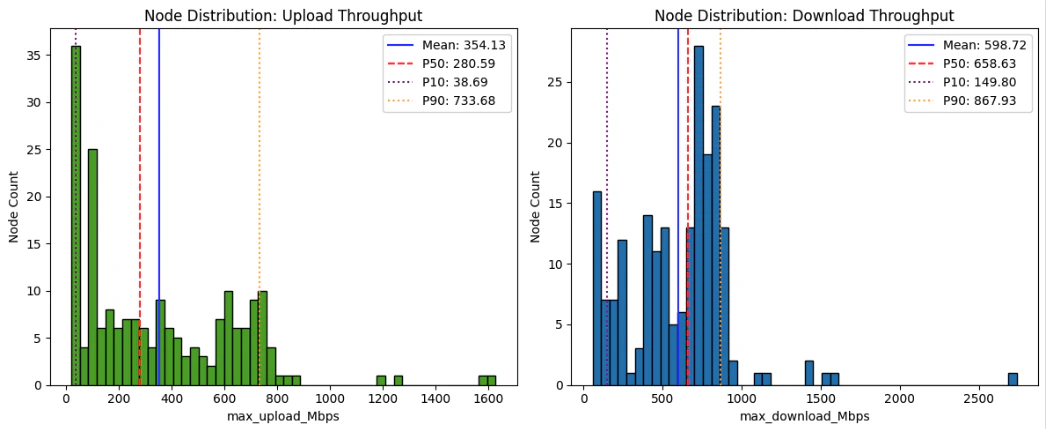
The results from Python Speedtest are noticeably lower than the maximum
throughput recorded in our tests, where each node underwent 24 runs (3 tools x 8 buckets) for each direction to capture
peak performance. In contrast, Speedtest was run only once per node, making it more vulnerable to transient factors like
packet loss. Additionally, its accuracy is constrained by the physical distance and network conditions between the node
and the chosen test server.
Note: Around 20% of nodes failed to run the Python Speedtest during the test, likely due to traffic being blocked by
certain ISPs.
Bandwidth Asymmetry Across Nodes
SaladCloud exhibits notable asymmetric bandwidth, as many nodes operate on residential networks that typically offer high download speeds—often in the hundreds of Mbps—but lower upload speeds, sometimes only tens of Mbps. Despite this, a considerable number of Salad nodes still provide symmetric bandwidth with strong performance. If your applications require symmetric bandwidth or higher upload throughput, perform startup checks from inside the container and request reallocation only when a node does not meet a real workload requirement.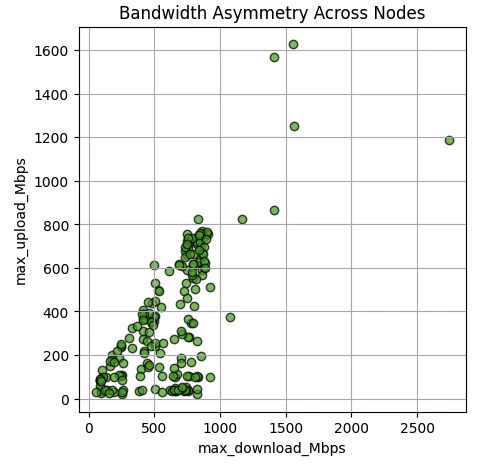
Tool Performance and Failure Rates
Rclone achieved a 0% failure rate across all directions, nodes and buckets during the test, demonstrating exceptional reliability. However, this reliability came at a performance cost—its average upload and download throughput were approximately 25% lower than the best-performing tool, TypeScript. Python and TypeScript showed comparable upload performance, but TypeScript significantly outperformed both Rclone and Python in download throughput—enabling 77.5% of nodes to reach their maximum download speed. This advantage is likely attributed to TypeScript’s asynchronous concurrency model, which is well-suited for high-concurrency I/O operations. However, its higher failure rate of 2% highlights the need for robust error handling in such environments. In contrast, Python’s performance may be limited by the Global Interpreter Lock (GIL), which can constrain multi-threaded I/O operations and reduce overall concurrency. Despite this, it maintained a low failure rate of just 0.1%, making it a balanced choice between performance and stability.
Note: The test did not implement any retry mechanism. By design, each upload failure led to a corresponding ‘NotFound’
error during the download phase, as the test cases assumed successful uploads.