Documentation Index
Fetch the complete documentation index at: https://docs.salad.com/llms.txt
Use this file to discover all available pages before exploring further.
Last Updated: August 25, 2025
Overview
Please familiarize yourself with GROMACS and
GROMACS with Job Queue
on SaladCloud before running the recipe.
You’ll need to provide access to S3-compatible storage when launching the recipe. After the container group is running,
you can submit jobs to the Salad Kelpie. The instances then retrieve them from the Kelpie platform, download necessary
files from the storage, execute the simulations, and upload both the state and results.
The environment includes:
- Python Environment - Miniconda 25.5.1 with Python 3.12
- GROMACS 2024.5(CUDA 11.8)without MPI - For high-performance molecular dynamics simulations
- VS Code Server - Optional remote development access
- Kelpie 0.6.0 - The Kelpie worker, which retrieves jobs from the Kelpie platform and calls simulation applications
- GROMACS Application - Support chunked simulations with self-managed data synchronization
Deployment
The following variables are required to run the recipe:
# Unique identifier for each container group on SaladCloud.
CONTAINER_GROUP_NAME="gromacs-kelpie-recipe-001"
# Access to the S3-compatible Cloud Storage
AWS_ENDPOINT_URL=https://******.r2.cloudflarestorage.com
AWS_ACCESS_KEY_ID=******
AWS_SECRET_ACCESS_KEY=******
AWS_REGION=******
# The name of current project where the container group is created.
SALAD_PROJECT=******
# Replica count, based on need
Replicas=2
You can adjust the hardware configuration—including vCPU, memory, and GPU—as needed.
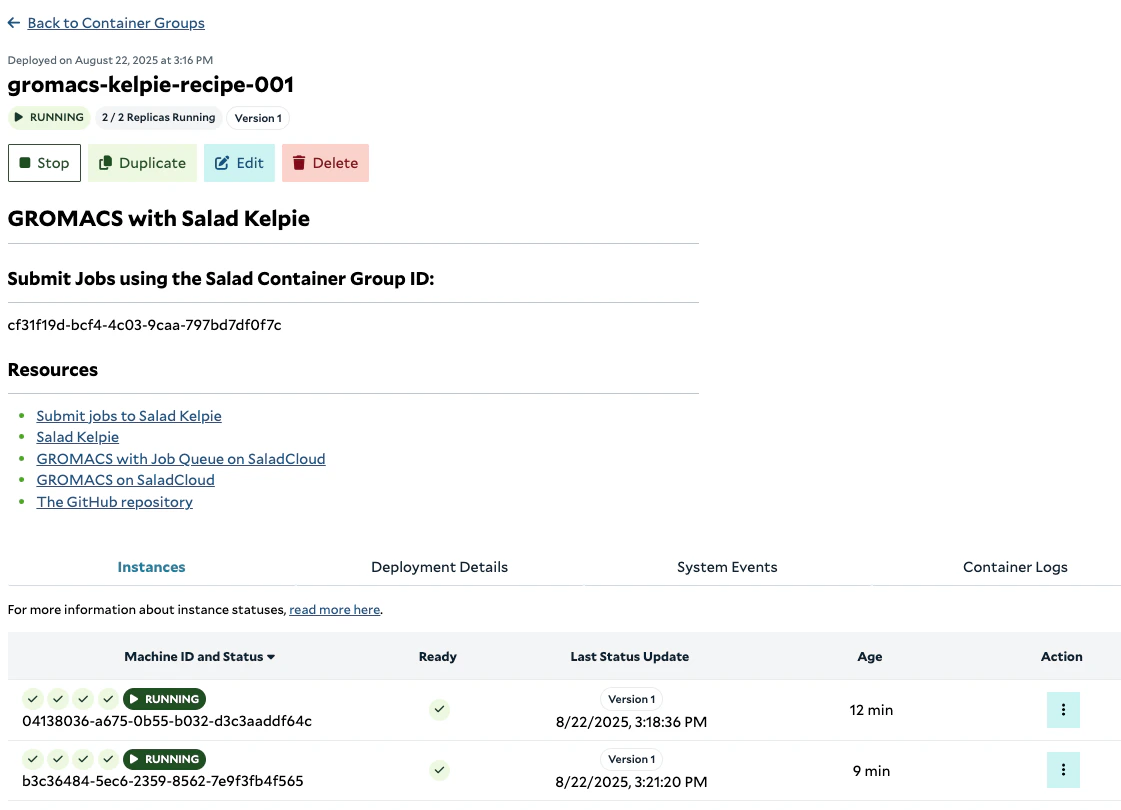
Once the container group is running, record its Salad Container Group ID for use when submitting jobs.
Job Submission and Monitoring
Ensure that all job input files are uploaded to the storage before submitting the jobs.
BUCKET/PREFIX/job1/j1.tpr
The following environment variables are required to run
submit_jobs.py:
# Access to the Kelpie platform.
KELPIE_API_URL=https://kelpie.saladexamples.com
SALAD_API_KEY=salad_cloud_user_******
SALAD_ORGANIZATION=******
SALAD_PROJECT=******
# Retrieve the ID upon workload creation or query in SaladCloud.
SALAD_CONTAINER_GROUP_ID=<CONTAINER_GROUP_ID_FROM_SALADCLOUD>
BUCKET="BUCKET_NAME"
PREFIX="PREFIX_NAME"
# To keep track of all submitted job IDs for querying their status later.
JOB_HISTORY="job_history.txt"
To monitor the status of a job, run
query_job.py.
The following files are generated during the job execution and uploaded back to the storage:
BUCKET/PREFIX/job1/j1.tpr # Original input file
BUCKET/PREFIX/job1/history.txt
BUCKET/PREFIX/job1/j1.cpt
BUCKET/PREFIX/job1/j1.part0001.edr
BUCKET/PREFIX/job1/j1.part0001.gro
BUCKET/PREFIX/job1/j1.part0001.log
BUCKET/PREFIX/job1/j1.part0001.trr
For more information on job definition, submission, and processing, see
this link
.
Source Code
The complete source code for this recipe is available in the
SaladCloud Recipes GitHub repository.
Resources