

Introduction
Image captioning and labeling plays an important role in many AI and ML training workloads, and until fairly recently, has been limited in effectiveness both by available technology and cost. This guide will show you how to deploy a Vision-Language Model (VLM) for image captioning using SaladCloud. Vision-Language models provide substantial improvements over previous-generation solutions based on CLIP and BLIP. The ability to include a text prompt along with your image gives you a great deal of control as to the style and content of the returned captions. For the model, we will be using Qwen 2.5 VL 7B Instruct, an Apache 2.0 licensed model from Alibaba that excels at visual understanding, including reading text. We will use 🤗 Text Generation Inference (TGI) as an inference server. Any TGI-compatible VLM can be substituted. Prompt: What is in this image? Include details.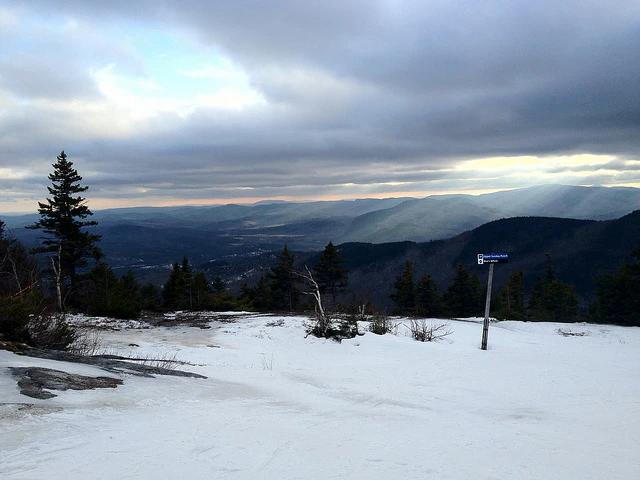
The image shows a snowy landscape, likely taken on a mountaintop or hillside. The ground is covered with patches of snow, with some bare soil and vegetation visible where the snow has melted or been pushed away. In the distance, a hazy horizon stretches toward what appears to be valleys and mountains. There is dense evergreen forest predominantly visible on the slopes, adding depth and texture to the scene. The sky is cloudy, with slashes of sunlight breaking through on the right, indicating that the sun might be setting or emerging from behind a cloud formation. A blue signpost, common for hiking trails, is tilted on the right side, suggesting directionality. The overall atmosphere is serene and remote, typical of a high-altitude or wilderness mountainous area with no visible human structures.
Build A Docker Image
It is actually possible to deploy this model using just the base TGI docker image, but that method will cause the model weights to be downloaded at runtime. Since SaladCloud does not bill for the time the container image downloads, but it does bill once the container starts running, we can save costs by building a custom Docker image with the model weights pre-downloaded. First, we’re going to download the model weights and configuration files. We will do this using the TGI docker image, and mounting a local directory to/data in the container.
Dockerfile in the same directory as the data directory, and add the following content:
Deploy To SaladCloud
You can deploy your container group either using the Portal or the SaladCloud API. Here is an example of a container group configuration that you can use to deploy this:HOSTNAME is set to ::, which allows the server
to listen on ipv6 interfaces, as required by SaladCloud. The above example does not enable authentication, but you can
by setting .networking.auth to true.
Save the above configuration to a file container-group.json, and submit it to the SaladCloud API to deploy your
container group.
Using The Model
Once the container group is running, you can access swagger documentation at/docs. This will show you the available
API endpoints and how to interact with them. We will be using the OpenAI-compatible /v1/chat/completions endpoint to
generate image captions.
To generate a caption for an image, it needs to be downloadable via a URL. This can be accomplished with just about any
cloud storage provider, and can also be done with Salad’s S4 service. Here is an example
of how to generate a caption for an image using the TGI server:
max_tokens parameter to control the
length of the generated caption. The image_url parameter should be a URL to the image you want to generate a caption
for.