STEP 1: Data Collection from YouTube
We need to develop a job generator capable of accepting named channels or playlists, as well as keywords, as input parameters. This generator will then produce multiple channel metadata files containing detailed information such as video title, URL, duration, codec, and other relevant data. Additionally, it will create an index file that maps each channel to its corresponding metadata file, ensuring organized and accessible storage of the collected data.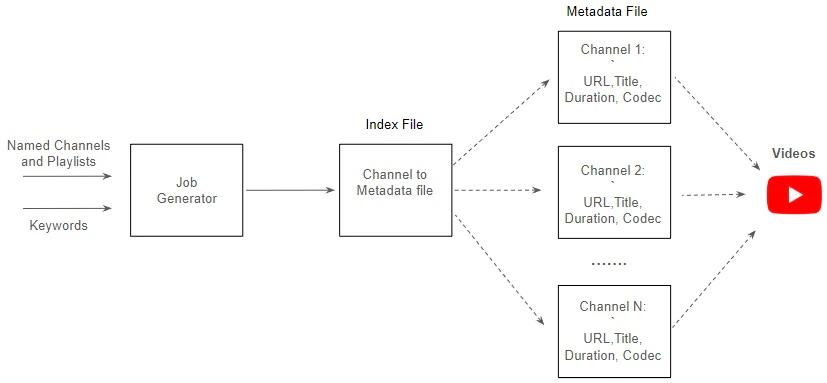
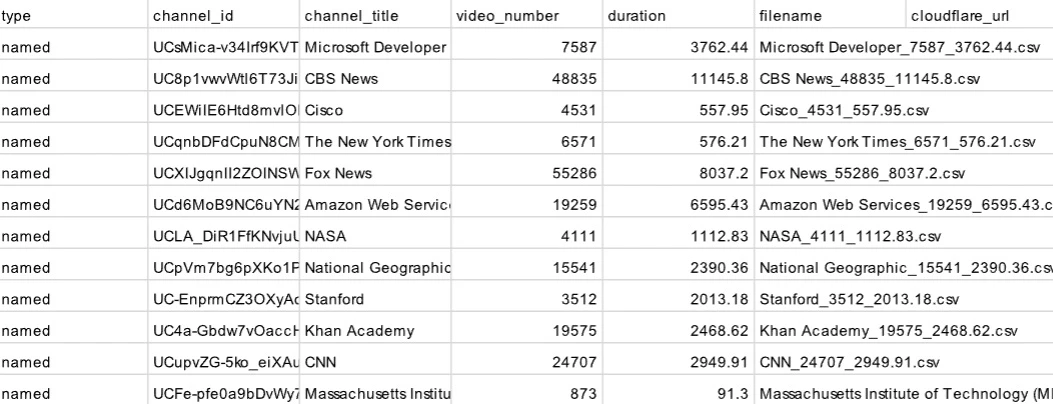
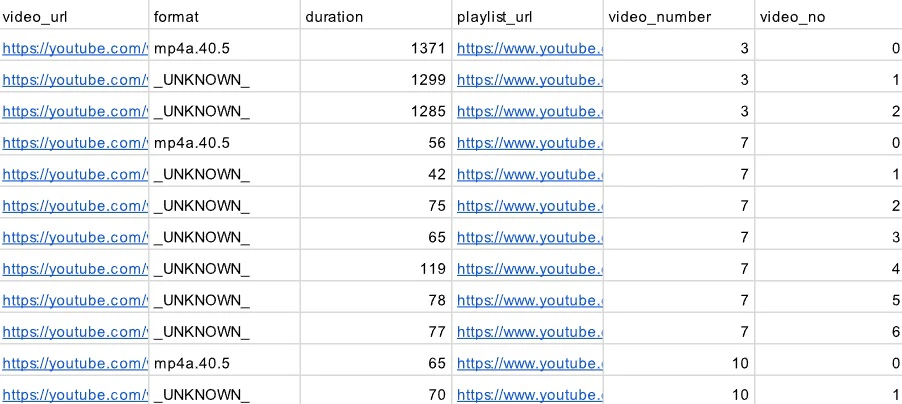
Build the Job Generator
We can utilize a variety of tools and libraries to construct the job generator:YouTube Data API v3 and Google API Client Library
This tool offers all the necessary functionalities for interacting with YouTube, such as searching channels, playlists, and videos based on keywords, retrieving all playlists from a particular channel, and uploading/downloading videos. To utilize the API, we must possess a Google Account to request an API key and choose a client library, such as Python. While the API is free to use, each GCP project enabled with the YouTube Data API has a default quota allocation of 10,000 units per day. All API requests, including invalid requests, incur a quota cost. Now, let’s calculate the quota cost for collecting video URLs from a search on a specific keyword:
The default quota allocation of 10,000 units per day may prove insufficient if we need to collect numerous video URLs in
a short time frame. We can create several GCP projects with each providing 10,000 units per day, or we could also
complete an audit and request an
additional quota following the process. Here we provide a combined solution by using both YouTube Data API and Pytube.
Pytube, a lightweight library for downloading YouTube videos
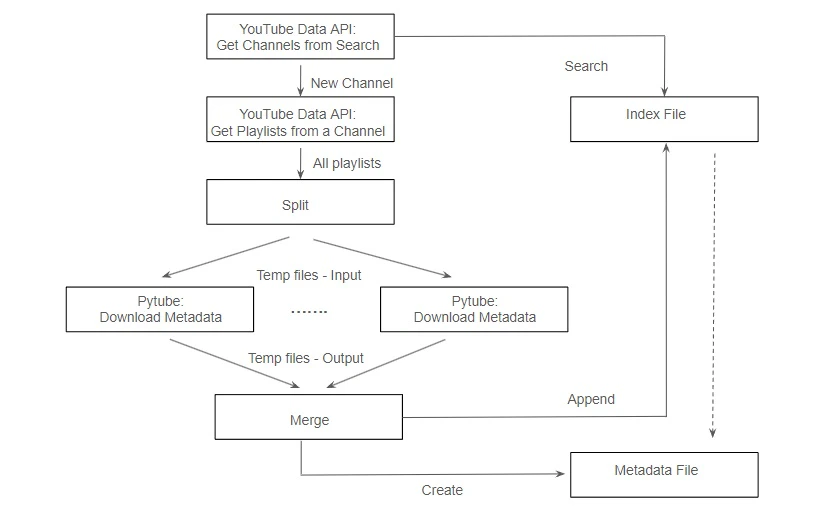
Pytube bypasses the YouTube Data API by directly scraping the YouTube website, thereby avoiding any quota limits imposed by the API. However, it does not offer access to the complete range of functionalities available through the YouTube API. For instance, it lacks the ability to perform searches with diverse request parameters such as location and relevance language. Nevertheless, Pytube excels at retrieving all video URLs and associated metadata (such as title, codec, video or audio format, etc.) within a specified playlist, and filtering and downloading streams, the tasks that would otherwise consume the most significant portion of the quota cost units if executed using the YouTube Data API. A combined solution enables us to harness the strengths of both tools while alleviating their respective limitations. Utilizing the YouTube Data API and its Python Client, we can search for channels based on keywords and retrieve all playlists within each channel. Subsequently, Pytube can be utilized to download all video metadata from these playlists. It is noteworthy that Pytube does not have a limit on API quota, but it is still constrained by the number of concurrent accesses from a single IP address imposed by YouTube.The reference design for the job generator
Build the job generation pipeline
To further enhance the efficiency of the job generation process, we can divide the job generator into several components and build a job generation pipeline: Channel Manager: This component manages the index file and supports operations such as search, creation, and update. It needs to be publicly accessible and can be implemented using AWS Lambda backed by AWS DynamoDB. Channel Collector: This component gathers relevant channels based on specific topics. It interacts with the Channel Manager to verify the existence of a channel and creates a new record if it doesn’t already exist. Once validated, it sends the channel URL to the job queue, such as AWS SQS, for further processing. Metadata Downloader: This component runs on a pool of SaladCloud nodes distributed across the global Internet. Each node retrieves a channel URL from the job queue, gathers all playlists within the channel, and downloads video metadata from these playlists using the multiprocessing approach. Upon completion, it creates the channel metadata file in Cloudflare, updates the corresponding record through the Channel Manager, and removes the processed job from the queue. With this solution, we can effectively harness the global distributed network provided by SaladCloud, significantly accelerating the job generation process by tens or even hundreds of times.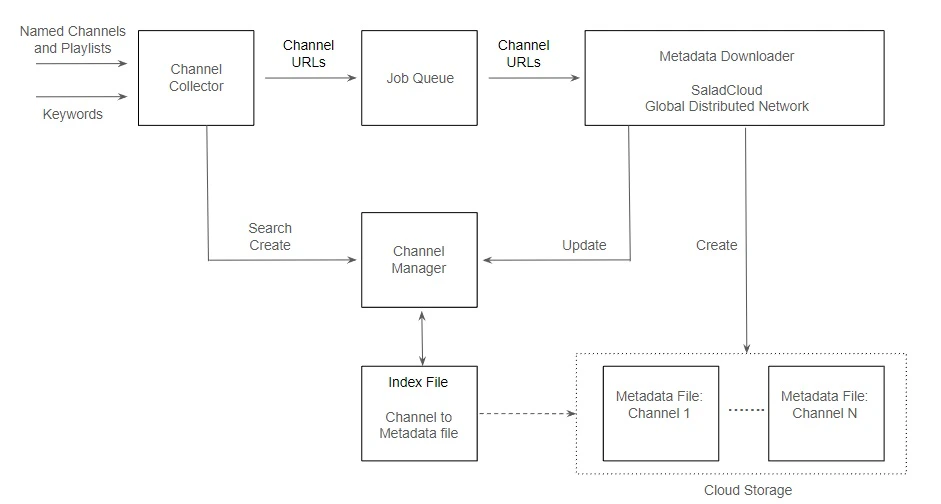
STEP 2: Data Processing on SaladCloud
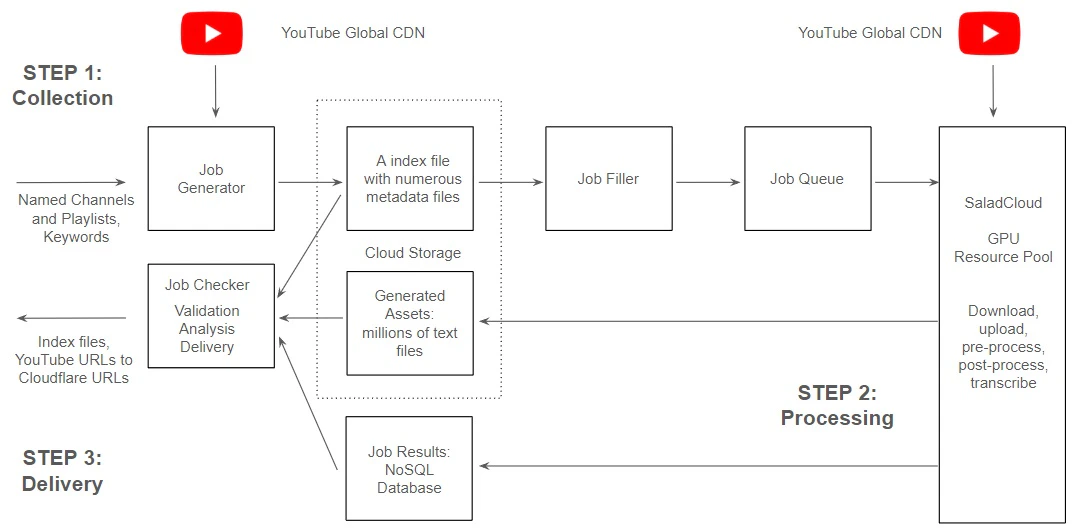
The transcription pipeline consists of: YouTube and its CDN: YouTube utilizes a Global Content Delivery Network (CDN) to distribute content efficiently. The CDN edge servers are strategically dispersed across various geographical locations, serving content in close proximity to users, and enhancing the speed and performance of applications. GPU Resource Pool and Global Distributed Network: Hundreds of SaladCloud nodes, equipped with dedicated GPUs, are utilized for tasks such as downloading/uploading, pre-processing/post-processing and transcribing. These nodes assigned to GPU workloads are positioned within a global, high-speed distributed network infrastructure, and can effectively align with YouTube’s Global CDN, ensuring optimal system throughput. Job Queue System: The SaladCloud nodes retrieve jobs via the message queue like AWS SQS, providing the video URLs and where to store the generated assets (Cloudflare URLs). Job Filler: It generates jobs based on the index file and metadata files during the STEP 1, monitors the transcription pipeline process and ensures a consistent supply of tasks by replenishing them regularly. Cloud Storage: Generated assets stored in Cloudflare R2, which is AWS S3-compatible and incurs zero egress fees. Job Recording System: Job results, including YouTube video URLs, audio length, processing time, Cloudflare URLs, word count etc., are stored in NoSQL databases like AWS DynamoDB.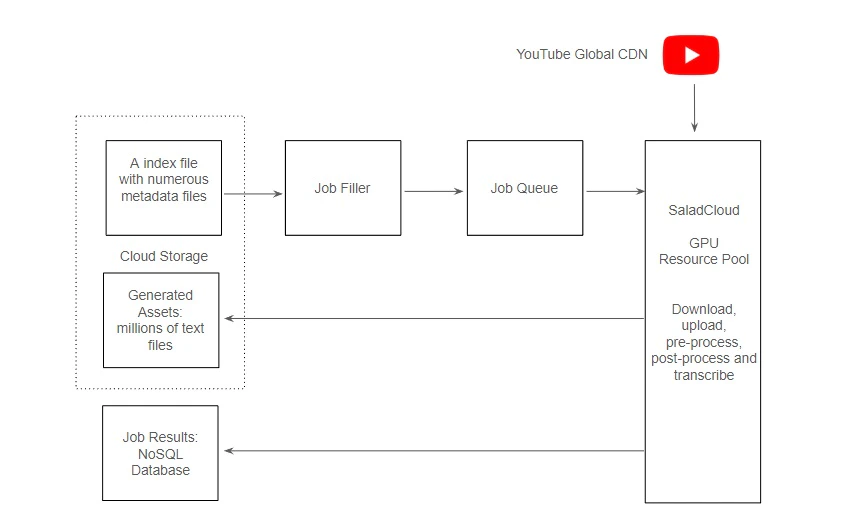
Job Filler
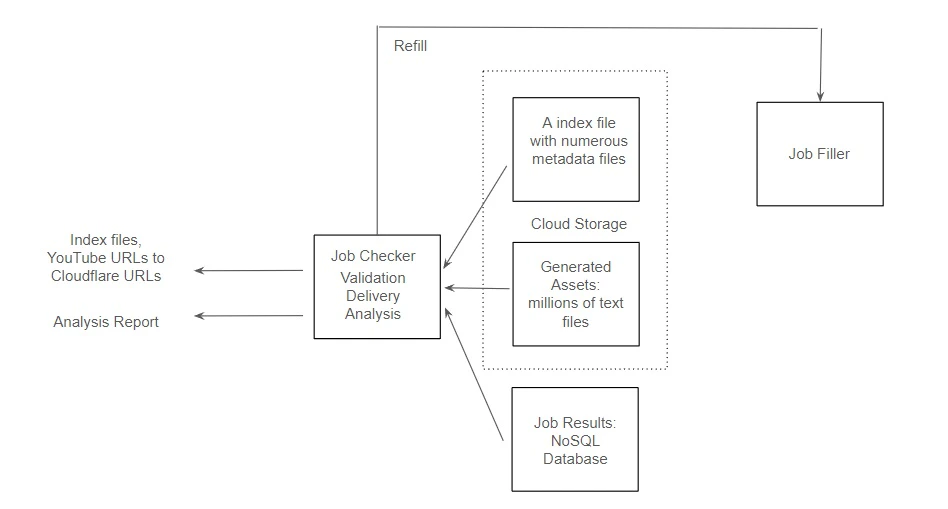
The job filler must be versatile in supporting multiple job injection strategies. It should be capable of injecting millions of hours of video URLs to the job queue instantly and remains idle until the pipeline completes all tasks. However, a potential issue with this approach arises when certain nodes in the pipeline experience downtime and fail to process and remove jobs from the queue. Consequently, these jobs may reappear for other nodes to attempt processing, potentially causing earlier injected jobs to be processed last, which may not be suitable for certain use cases. Another approach is to continuously monitor the size of the job queue. The job filler will inject new jobs only when there are nearly no available tasks left in the queue. This method ensures that the pipeline can complete time-sensitive tasks efficiently. The job filler must maintain high availability, as any failure could potentially cause the pipeline to run idle, leading to delays in task completion. Here is an example: Every day, we initially inject a large batch of jobs into the pipeline and monitor progress. When the queue is nearly empty, we start injecting only a few jobs and aim to keep the number of available jobs in the queue as low as possible for a period of time. This strategy allows us to prioritize completing older jobs before injecting a massive influx of new ones.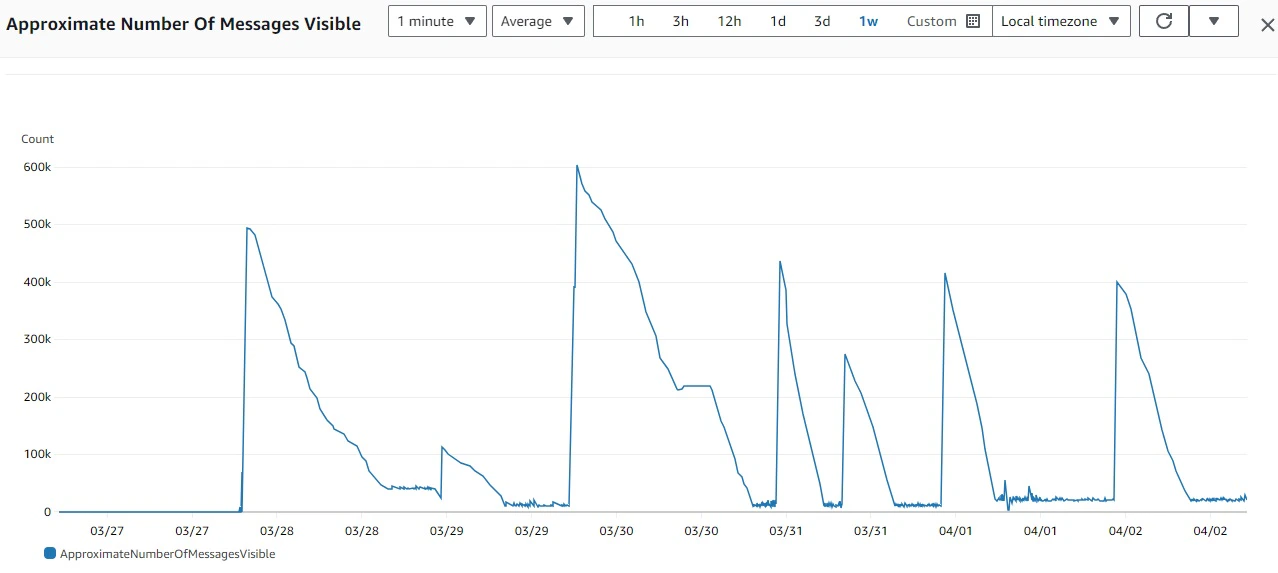
The reference design for the job filler
Job Filter: It filters the original video URLs based on video length and channels, removing unqualified content such as videos that are too short or too long, purely musical, or in a non-English language, etc. Subsequently, generates a specified number of hours of tasks from the index file and metadata files, and adds them to the local job queue. The job filter utilizes a cursor to track progress and generate new tasks after the position of the last generated task, thereby supporting various job injection strategies. Job Uploader: Operates on multiple threads to boost throughput; each thread retrieves jobs from the local job queue, and uses AWS SendMessageBatch to transmit up to 10 jobs simultaneously. Through testing, the job filler has demonstrated the capability to inject up to 1 million jobs to AWS SQS within a single hour.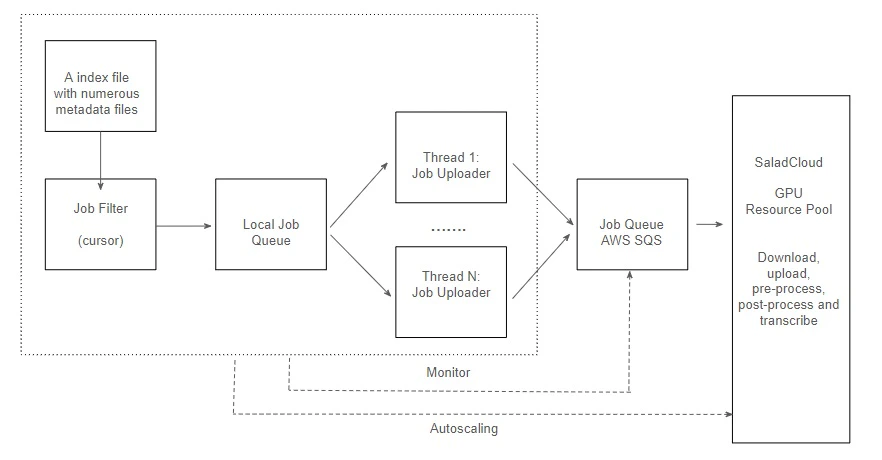

Job Queue System Settings
We set the AWS SQS Visibility Timeout to 1 hour. This allows sufficient time for downloading, chunking, buffering, and processing by most of the nodes in SaladCloud until final results are merged and uploaded to Cloudflare. If a node fails to process and remove polled jobs within the hour, the jobs become available again for other nodes to process. Additionally, the AWS SQS Retention Period is set to 2 days. Once the message retention quota is reached, messages are automatically deleted. This measure prevents jobs from lingering in the queue for an extended period without being processed for any reason, thereby avoiding wastage of node resources.Node Implementation on SaladCloud (using Parakeet TDT 1.1B)
Within each node in the GPU resource pool in SaladCloud, we follow best practices by utilizing two processes: the Inference Process, dedicated to GPU-based transcription inference; and the Benchmark Worker Process, focused on I/O- and CPU-bound tasks, such as downloading/uploading, pre-processing, and post-processing.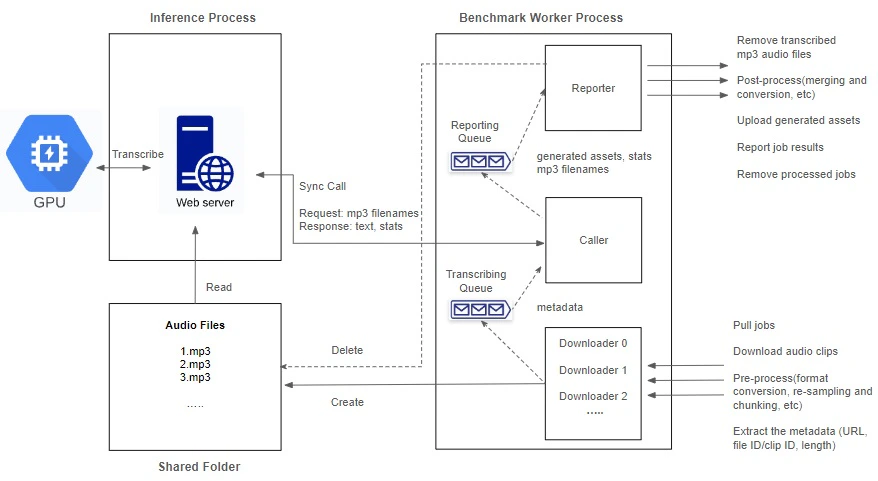
Inference Process
The transcription for audio involves resource-intensive operations on both CPU and GPU, including format conversion, re-sampling, segmentation, transcription and merging. The more CPU operations involved, the lower the GPU utilization experienced. While having the capacity to fully leverage the CPU, multiprocessing or multithreading-based concurrent inference over a single GPU might limit optimal GPU cache utilization and impact performance. This is attributed to each inference running at its own layer or stage. The multiprocessing approach also consumes more VRAM as every process requires a CUDA context and loads its own model into GPU VRAM for inference. Following best practices, we delegate more CPU-bound pre-processing and post-processing tasks to the benchmark worker process, allowing the inference process to concentrate on GPU operations and run on a single thread. It begins by loading the model, warming up the GPU, and then listens on a TCP port by running a Python/FastAPI app on a Unicorn server. Upon receiving a request, it invokes the transcription inference and promptly returns the generated assets. Batch inference can be employed to enhance performance by effectively leveraging GPU cache and parallel processing capabilities. However, it requires more VRAM and might delay the return of the result until every single sample in the input is processed. The choice of using batch inference and determining the optimal batch size depends on model, dataset, hardware characteristics and use case; and requires experimentation and ongoing performance monitoring.Benchmark Worker Process
The benchmark worker process primarily handles various I/O- and CPU-bound tasks, such as downloading/uploading, pre-processing, and post-processing. The Global Interpreter Lock (GIL) in Python permits only one thread to execute Python code at a time within a process. While the GIL can impact the performance of multithreaded applications, certain operations remain unaffected, such as I/O operations and calling external programs. To maximize performance with better scalability, we adopt multiple threads to concurrently handle various tasks, with two queues created to facilitate information exchange among these threads.
By running two processes to segregate GPU-bound tasks from I/O and CPU-bound tasks, and fetching and preparing the next
audio clips concurrently and in advance while the current one is still being transcribed, we can eliminate any waiting
period. After one audio clip is completed, the next is immediately ready for transcription. This approach not only
reduces the overall processing time for batch jobs but also leads to even more significant cost savings.
Please refer to the example code
for the node implementation.
Optimization of Performance and Throughput
You can define a resource group on SaladCloud that encompasses various GPU types. These resources are distributed across the global Internet, each with varying bandwidth and latency to specific endpoints. Moreover, the performance of each node and the number of running replicas within a group may fluctuate over time due to their shared nature. To optimize node performance and system throughput, consider the following best practices: Define Initialization Time Threshold: Establish a threshold for initialization time, encompassing tasks such as model loading and warm-up. If a node’s initialization time exceeds this threshold, such as 300 seconds, the code should exit with a status of 1. SaladCloud will allocate a new node in response, ensuring that nodes are adequately prepared to execute your application. Monitor Real-Time Performance: Continuously monitor application performance within a specific time window. If performance metrics, such as the real-time factor (calculated as audio length divided by processing time, serving as an efficient measure of transcription performance), fall below a predefined threshold, the code should exit with a status of 1, prompting reallocation. This practice ensures that nodes remain in an optimal state for application execution. For example, most nodes can achieve a real-time factor of 80 or higher for long audio; if the real-time factor of a node falls below 20 during a monitoring period, it should be removed from the resource pool immediately. Adopt Adaptive Algorithms: Recognize that nodes may vary in GPU types and network performance. High-performance nodes can handle longer chunks with a large transcription queue (100), whereas low-performance nodes are better suited for processing shorter chunks with a smaller transcription queue (50). By employing adaptive algorithms, resource utilization can be optimized, while preventing low-performance nodes from impeding overall progress.Single Node Test
Before deploying the application container image on a large scale on SaladCloud, we can build a specialized application image with JupyterLab and conduct the single-node test across various types of SaladCloud nodes. With JupyterLab’s terminal, we can log into a container instance running on SaladCloud, gaining OS-level access. This enables us to conduct various tests and optimize the configurations and parameters of the model and application. These include: Measure the time to download the model and then load it into the GPU, including warm-up, to define the appropriate health check count. Analyze the VRAM usage variations during the inference process based on long audio lengths and different batch sizes, and select the best performing or most cost-effective GPU types for the application. Determine the minimum number of downloader threads and maximum length limit of the transcribing queue to efficiently feed the inference server. Identify and handle various possible exceptions during application runtime, etc.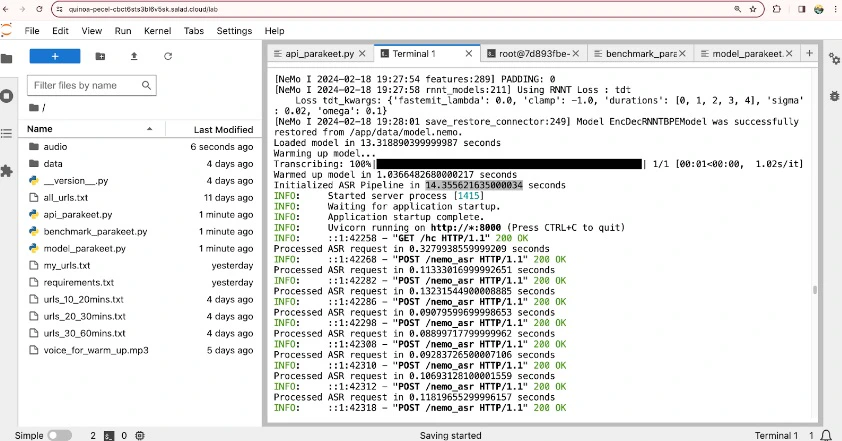
STEP 3: Validation, Delivery and Analysis
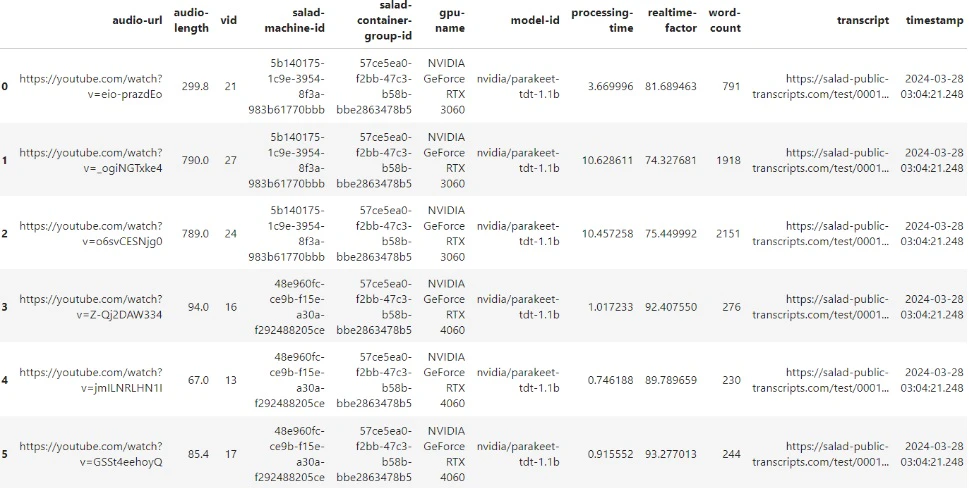
Job results, which include video URL, audio length, processing time, Cloudflare URL, and word count for each video, serve multiple purposes.